Map Radius Tool – Draw a Radius on a Map Online
Use a map radius tool to draw a circular area around a location and understand the distance covered around a selected point. It can help with location research, service areas, travel planning, property checks, and other map-based tasks.
FieldCalc helps property professionals, businesses, travelers, and outdoor users work with locations and map-based measurements.
43.5M+
Measurements Completed

29M+
Users Worldwide

How to Use the Map Radius Tool
Creating a radius on a map is simple. The tool creates a visual boundary around a selected location based on the distance you enter. This makes it easier to understand how far an area extends from a central point.
Open the map and search for the location you need.
Select the point where you want to place the radius.
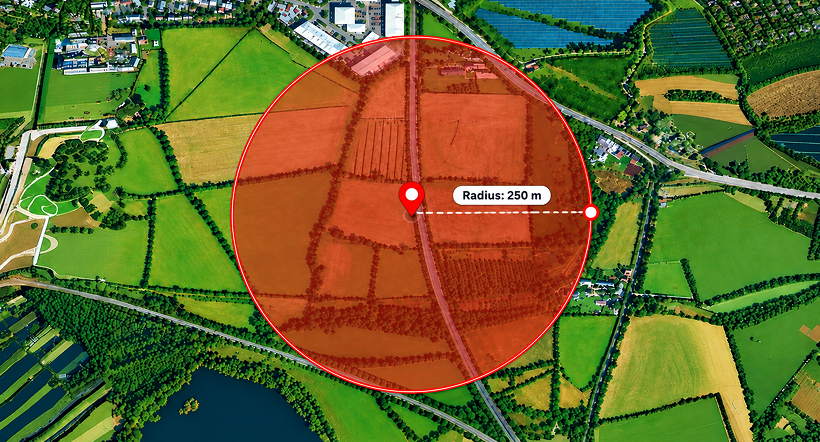
Enter the distance you want to measure around that point.
Adjust the location or distance if needed.
View the circular area displayed on the map.
Features and Benefits
Create clear map-based radius areas with simple controls and flexible distance settings.

Location-Based Radius
Choose a location on the map and create a circular area around it to see the distance covered from the selected point.

Adjustable Distance
Set the radius based on the distance you want to review. This can help when comparing different coverage areas.

Interactive Map View
The map with radius tool displays the selected area directly on the map, making the coverage easier to understand visually.

Easy Location Search
Find a location on the map and use it as the center of your radius without manually working with coordinates.

Simple Online Access
Use the tool directly in your browser when you need a quick way to visualize distance around a location.
Uses of Map Radius Tool
Create radius areas for different location-based and planning tasks.

Business and Service Areas
Businesses can view areas surrounding a location to understand potential service or coverage zones.

Real Estate
Property professionals can review locations within a selected distance when comparing nearby properties and local areas.

Travel and Local Search
Travelers can use a radius to understand what places or areas fall within a chosen distance from a location.

Location Research
Users can create different radius areas to compare locations and understand the space surrounding a selected point.




How Radius on a Map Works
A radius represents the distance from a central point to the edge of a circular area. When you select a location and enter a distance, the tool uses that point as the center and displays the corresponding radius on the map.
People looking for a google maps radius tool often want to visualize a specific distance around a location. A map-based radius tool provides this information as a circle, making the coverage area easier to see than a distance value alone.
The displayed area depends on the selected center point and radius distance. Map position and the accuracy of the selected location can also affect the result.
Reviews and User Feedback
Users find the tool helpful for visualizing distances and understanding areas around selected locations.

Arjun Mehta
Property Consultant
It makes it easy to see how far an area extends from a specific location.

Neha Sharma
Real Estate Advisor
Helpful for checking nearby areas when comparing different locations.

Daniel Wilson
Business Consultant
A simple way to visualize service areas around a business location.

Emily Carter
Travel Planner
Useful for understanding the distance covered around a selected point on the map.
Emily Carter
Travel Planner
Useful for understanding the distance covered around a selected point on the map.
Arjun Mehta
Property Consultant
It makes it easy to see how far an area extends from a specific location.
Neha Sharma
Real Estate Advisor
Helpful for checking nearby areas when comparing different locations.
Frequently Asked Questions
A map radius tool creates a circular area around a selected location to show a specific distance from that point.
A map-based tool can create a radius around a selected location and display the area visually on an interactive map.
You select a central location, enter a distance, and the tool displays a circle showing that distance around the chosen point.
Yes. You can enter different distances to create radius areas that match your specific needs.
Yes. A free map radius tool can help you visualize distances around locations without needing complex mapping software.
Need More Measurement Tools?
Explore other calculators for distance, area, and radius measurements.